> For the complete documentation index, see [llms.txt](https://docs.serenicity.fr/control/llms.txt). Markdown versions of documentation pages are available by appending `.md` to page URLs; this page is available as [Markdown](https://docs.serenicity.fr/control/introduction/appareils-favoris.md).
# Appareils favoris
Les appareils favoris sont épinglés sur la page d'accueil et permettent d'accéder rapidement à leur dashboard.
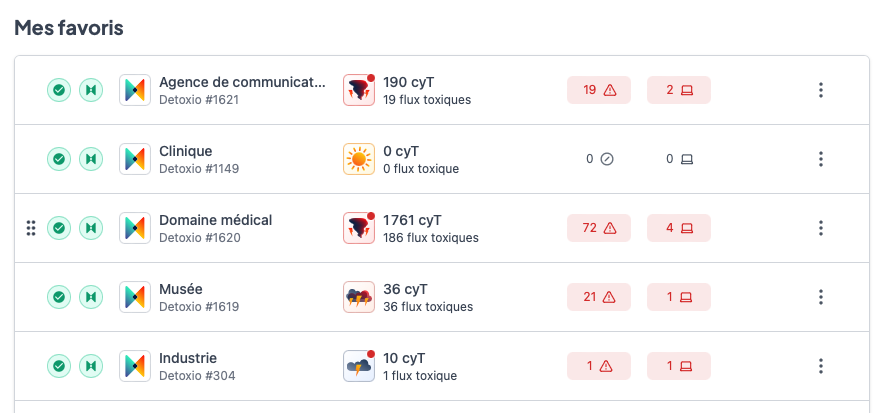
Appareil favoris
L'ordre des appareils peut également être modifié en les faisant glisser grâce à l'icône .
Pour chaque appareil favori est présenté :
* Son statut, son mode de fitrage, et l'option Cleaner
* Le nom de l'appareil en accès rapide vers le dashboard
* La Cybermétéo du jour de l'appareil associée au nombre de flux toxiques
* Le nombre de menaces détectée sur la journée, un clic dirige vers les menaces détectées
* Le nombre de périphériques toxiques sur la journée, un clic dirige vers les périphériques
 .
Pour chaque appareil favori est présenté :
* Son statut, son mode de fitrage, et l'option Cleaner
* Le nom de l'appareil en accès rapide vers le dashboard
* La Cybermétéo du jour de l'appareil associée au nombre de flux toxiques
* Le nombre de menaces détectée sur la journée, un clic dirige vers les menaces détectées
* Le nombre de périphériques toxiques sur la journée, un clic dirige vers les périphériques
.
Pour chaque appareil favori est présenté :
* Son statut, son mode de fitrage, et l'option Cleaner
* Le nom de l'appareil en accès rapide vers le dashboard
* La Cybermétéo du jour de l'appareil associée au nombre de flux toxiques
* Le nombre de menaces détectée sur la journée, un clic dirige vers les menaces détectées
* Le nombre de périphériques toxiques sur la journée, un clic dirige vers les périphériques